PoloPrint Community

    • Login
    • Search
    • Recent
    • Tags
    • Popular
    1. Home
    2. 陆
    3. Posts
    • Profile
    • Following 0
    • Followers 2
    • Topics 1
    • Posts 269
    • Groups 1

    Posts made by 陆

    • RE: Prints going wrong at the end of every print

      @apple_user_1772925312

      To resolve the layer shift issue, please download the file provided below, copy it to your TF card, and then print the file on your printer:

      https://drive.google.com/open?id=1j2AYDr77ar_o_WF_8EzdHx3YcWPQ42SZ&usp=drive_fs

      Printing this file will help correct the issue and restore stable printing performance.

      After the print is completed, please test your original model again and let us know whether the problem has been resolved.

      If you continue to experience layer shifting, please feel free to contact us for further assistance.

      posted in TINA2 Serials
      陆
      Eric
    • RE: Unable to download prints from App- download error

      @Teddybearjones

      This type of issue is usually related to the Wi-Fi connection or network environment.

      We recommend that you send a screenshot of the WiFi Info page to our support email and provide a detailed description of the problem you are experiencing. This information will help our technical team investigate the issue more effectively.

      After reviewing the information, our support team may ask for your shipping address if any replacement parts or further after-sales service are required.

      posted in TINA2 Serials
      陆
      Eric
    • RE: add device

      @Tigger-0

      In this situation, it is usually because the printer has already been connected to a Wi-Fi network previously. If that is the case, you may not need to go through the Wi-Fi setup process again.

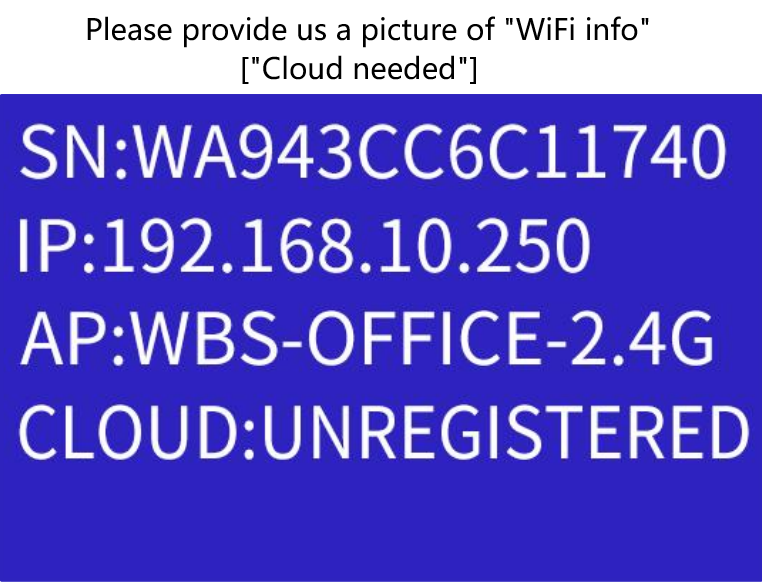
      We recommend sending the WiFi Info page or a screenshot of the network information to our support email so that our technicians can perform further diagnostics and help identify the cause of the issue.
      dd2f6c5d-b9d6-4bea-8d46-ae354fdaaa00-wifi info.png

      Regarding the account binding, you can simply scan the QR code and select "Request Unbinding". Once the request is submitted, we can review it and assist you with the unbinding process if necessary.

      posted in PoloPrint Cloud APP
      陆
      Eric
    • RE: Help me

      @Landon-6 After clicking "Scan to Bind Device", you should see an option labeled "Request Unbind".

      Please simply tap that option and follow the on-screen instructions to submit the unbinding request.

      posted in PoloPrint Cloud APP
      陆
      Eric
    • RE: Lychee profile for Tina2 Plus

      @M-6 Check the website: https://www.entina3d.com/pages/download-1

      posted in Slicer Softwre
      陆
      Eric
    • RE: Separating raft build causing damage

      @Shad-Ansah If the model can adhere to the build plate properly on its own, you can disable the Raft setting.

      A raft is primarily used to improve bed adhesion for models that have difficulty sticking to the build plate. If adhesion is already good, printing without a raft can save material, reduce print time, and make post-processing easier.

      posted in TINA2 Serials
      陆
      Eric
    • RE: Make this dragon you won’t regret it

      @Nora-1 Cool

      posted in Announcements
      陆
      Eric
    • RE: Help loading .stl to profile

      @Nora-1 We are referring to a screenshot of the error message shown in the app.😰

      Could you please send us a screenshot of the app error so we can review it?

      In addition, this issue is most often caused by the app account being logged out unexpectedly. Please try logging out and then logging back into the app.

      In many cases, simply signing in again resolves the problem.

      posted in PoloPrint Cloud APP
      陆
      Eric
    • RE: Not enough space

      @Kyle Based on feedback from previous customers, this issue has often been caused by the account being logged out unexpectedly.

      Could you please try logging out and then logging back into your account?

      In many cases, simply signing in again resolves the issue.

      posted in PoloPrint Cloud APP
      陆
      Eric
    • RE: How do I upload things to poloprint cloud and make them mobile

      @Dfifty5 At the moment, files can only be uploaded to the personal library and cannot yet be uploaded to the shared/public library.

      We understand this may be inconvenient, and we will consider adding this feature in future updates.

      posted in Announcements
      陆
      Eric
    • RE: Tina2+ in Bambu Studio

      @De-Anna-Williams The software requires a printer configuration profile in order to function correctly.

      Unfortunately, our machines are not compatible with Bambu Studio software at the moment, and we sincerely apologize for the inconvenience.

      You may instead try using Cura or our official Wiibuilder software, which are compatible with our machines.

      posted in TINA2 Serials
      陆
      Eric
    • RE: How do I upload things to poloprint cloud and make them mobile

      @3d_Masterz I would like to provide you with some helpful information on how to get started with 3D printing using models available online. Here’s a step-by-step guide to assist you:

      1. Download 3D Models: You can find a wide variety of 3D models to print from the following websites:

        • Thingiverse
        • Cults
        • Free3D
      2. Extract the Model Files: Once you find a model you like, download the file to your computer. These files are typically compressed in ZIP format. To access the model, you will need to unzip the file, which will reveal the STL file. The STL file is the standard format used for 3D printing.

      3. Prepare the Model for Printing: The next step is to prepare the model for printing, which involves slicing the STL file. This process converts the model into layers that your 3D printer can understand. Depending on your setup, you can do this using the following options:

        • Wiibuilder Software: You can learn how to use Wiibuilder software from this link on your computer.
        • Poloprint Cloud App: Alternatively, you can upload the STL file to the Poloprint Cloud app on your phone using this link.

      Feel free to reach out if you have any questions or need further assistance with your 3D printing projects.

      posted in Announcements
      陆
      Eric
    • RE: Surron 3d print

      @apple_user_1777036627 I would like to provide you with some helpful information on how to get started with 3D printing using models available online. Here’s a step-by-step guide to assist you:

      1. Download 3D Models: You can find a wide variety of 3D models to print from the following websites:

        • Thingiverse
        • Cults
        • Free3D
      2. Extract the Model Files: Once you find a model you like, download the file to your computer. These files are typically compressed in ZIP format. To access the model, you will need to unzip the file, which will reveal the STL file. The STL file is the standard format used for 3D printing.

      3. Prepare the Model for Printing: The next step is to prepare the model for printing, which involves slicing the STL file. This process converts the model into layers that your 3D printer can understand. Depending on your setup, you can do this using the following options:

        • Wiibuilder Software: You can learn how to use Wiibuilder software from this link on your computer.
        • Poloprint Cloud App: Alternatively, you can upload the STL file to the Poloprint Cloud app on your phone using this link.

      Feel free to reach out if you have any questions or need further assistance with your 3D printing projects.

      posted in Announcements
      陆
      Eric
    • RE: Cooler can koozie file

      @La-güera I would like to provide you with some helpful information on how to get started with 3D printing using models available online. Here’s a step-by-step guide to assist you:

      1. Download 3D Models: You can find a wide variety of 3D models to print from the following websites:

        • Thingiverse
        • Cults
        • Free3D
      2. Extract the Model Files: Once you find a model you like, download the file to your computer. These files are typically compressed in ZIP format. To access the model, you will need to unzip the file, which will reveal the STL file. The STL file is the standard format used for 3D printing.

      3. Prepare the Model for Printing: The next step is to prepare the model for printing, which involves slicing the STL file. This process converts the model into layers that your 3D printer can understand. Depending on your setup, you can do this using the following options:

        • Wiibuilder Software: You can learn how to use Wiibuilder software from this link on your computer.
        • Poloprint Cloud App: Alternatively, you can upload the STL file to the Poloprint Cloud app on your phone using this link.

      Feel free to reach out if you have any questions or need further assistance with your 3D printing projects.

      posted in PoloPrint Cloud APP
      陆
      Eric
    • RE: PetG help

      @Lunarria-Nightraven f88e74a3-cdbc-4b61-9f18-83ff3efeada8-QQ截图20260414091222.png

      You can find it in wiibuilder.

      posted in TINA2 Serials
      陆
      Eric
    • RE: Help loading .stl to profile

      @Louise-Davis-0 Could you plz offer some screenshot of the APP?

      posted in PoloPrint Cloud APP
      陆
      Eric
    • RE: Losing power during print

      @Maddison-Egloff-Luce When you turn on the printer, check if it says “resume printing.” If it does, you can continue. If not, you’ll need to start the print job again from the beginning.

      posted in TINA2 Serials
      陆
      Eric
    • RE: Tina2plus nozzle replacement

      @Alan-Kelly Plus does involve some trade-offs in compatibility due to its quick-release design, as the hotend is custom-made and limited to a 0.4 mm nozzle. We will update the website description to clarify this, and we sincerely apologize for any confusion caused.

      posted in TINA2 Serials
      陆
      Eric
    • RE: TINA2 Plus Slicers

      @apple_user_1775184850 Hi, you can get it here:
      https://www.entina3d.com/pages/download-1

      posted in TINA2 Serials
      陆
      Eric
    • RE: Help loading .stl to profile

      @Russellwarren30 said in Help loading .stl to profile:

      Can't get .stl file to load iny profile. It fails with unknown error. I even tried to upload a file that I've uploaded successfully before but they will not upload now. It just gives a pop up window thay says unknown failure. Help please.

      This issue was caused by a previous server upgrade. The upgrade has now been successfully completed, and the problem has been resolved.

      You may continue using the service with confidence.

      If you encounter any further issues, please feel free to contact us.

      posted in PoloPrint Cloud APP
      陆
      Eric